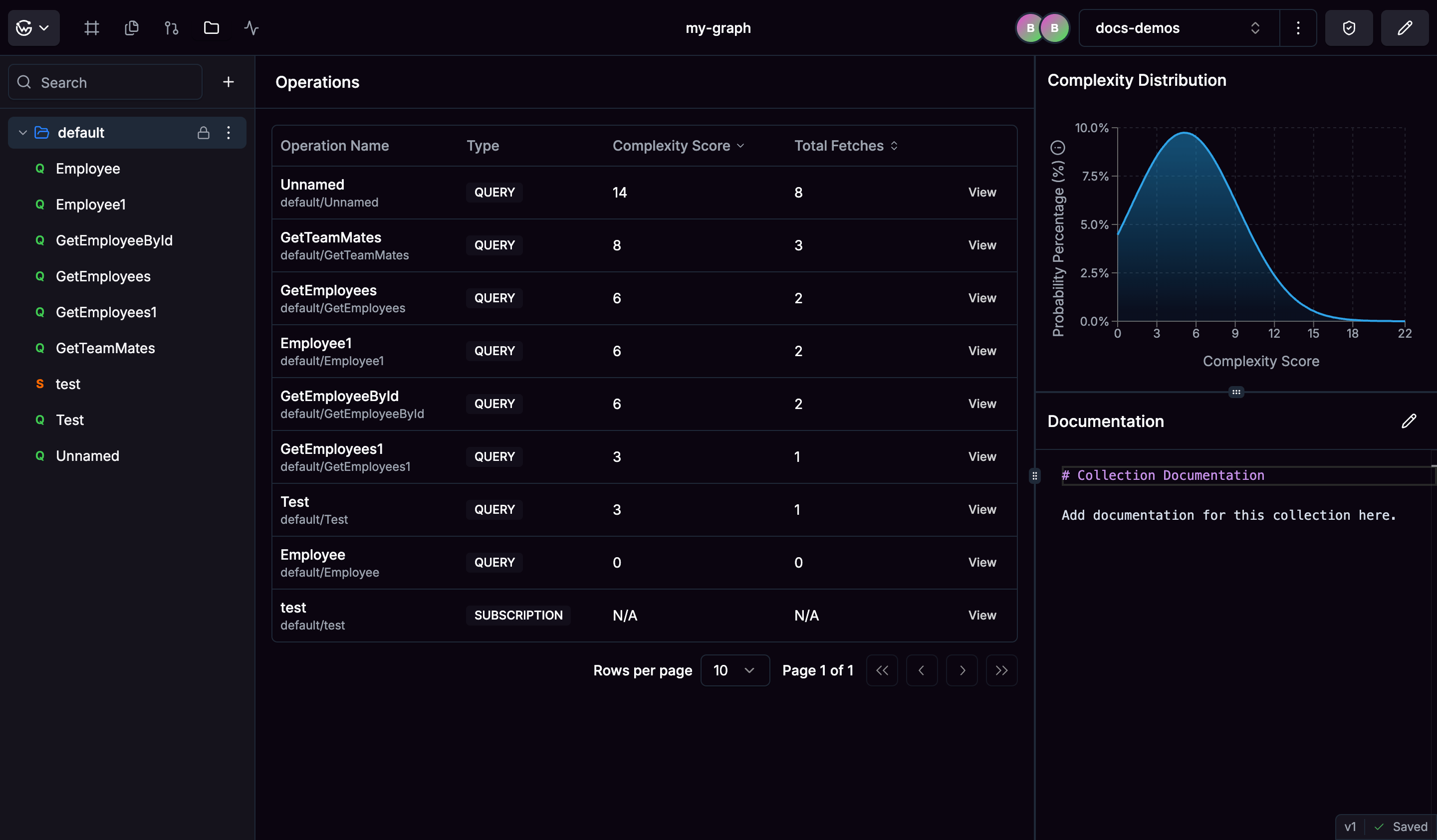
Think of collections as folders where you can group related operations together. You might create one for user management operations and another for product queries. You can nest folders inside each other and add README files to explain what each collection is for.When you connect registries like Cosmo, Hub automatically creates a “default” collection with all your existing operations. These imported collections are read-only, so you can’t accidentally change them. If you need updates from the external source, just hit recompute.
Store your queries, mutations, and subscriptions here. Hub checks that they work with your current schema and highlights any syntax errors. You can edit operations directly in the browser with syntax highlighting.Each operation gets a complexity score based on how much work it requires. This helps you spot operations that might be slow or expensive to run.
See how complex your operations are with visual charts. The graphs show you which operations are simple, which are complex, and help you understand patterns across your collections.The bell curve view gives you a quick overview of your collection’s complexity spread, making it easy to spot operations that might need optimization.
Add notes and examples using Markdown. Document your collections with usage guides or document individual operations with helpful descriptions. Everything is searchable so you can quickly find what you need.
Was this page helpful?
Assistant
Responses are generated using AI and may contain mistakes.